· by skunxicat
On this page
Beyond the User-Agent: Catching Spoofed Bots with JA4 and ASN
User-Agent strings are two lines of code to forge. IP reputation lists are stale before they’re published. Traditional WAF rules are a game of whack-a-mole against anyone who’s read the documentation.
This is the story of how a different approach — cross-referencing TLS handshake fingerprints against network infrastructure identity — caught a distributed scraper cluster that was doing everything right by conventional standards, and everything wrong by cryptographic ones.
The Problem with Header-Based Detection
When a request arrives at your CloudFront distribution, you get a handful of signals: the IP address, the User-Agent header, the path, the country. Classic bot detection logic operates on these.
The problem is that all of them are trivially controlled by the client.
- IP rotation through residential proxies or cloud egress nodes costs pennies per GB
User-Agentis a plain-text string — set it to anything in one line- Country headers reflect the exit node, not the operator
- Path behavior can be throttled to mimic human browsing patterns
A sophisticated scraper that rotates IPs, spoofs headers, and paces requests will sail through every header-based rule you write.
What they can’t easily fake is the TLS handshake.
What JA4 Actually Measures
When a client opens an HTTPS connection, it sends a ClientHello message before any HTTP headers are transmitted. This message contains the client’s TLS capabilities: which cipher suites it supports, which extensions it includes, which protocol versions it accepts, and whether it wants to negotiate HTTP/2 or HTTP/3 via ALPN.
JA4 hashes these fields into a compact fingerprint:
[protocol][version][SNI][cipher_count][ext_count][ALPN]_[cipher_hash]_[ext_hash]A real Chrome browser on macOS looks like this:
t13d1517h2_8daaf6152771_a87ad97598a9Decoded: TLS 1.3, SNI present, 15 cipher suites, 17 extensions, ALPN h2 (HTTP/2 negotiated).
The key insight: this fingerprint is generated by the TLS library compiled into the client binary, not by any header the application sets. A Go scraper using crypto/tls produces a Go fingerprint. A Python script using urllib3 produces a Python fingerprint. A real Safari browser produces a Safari fingerprint. You can set the User-Agent to anything you want — the TLS handshake tells the truth.
Here’s what a real event looks like coming out of the pipeline:
{
  "schema": "cloudless.ja4_event.v1",
  "type": "ja4",
  "site": "cloudless",
  "ip": "203.0.113.42",
  "ja4": "t13d4412h1_fd39b124ee10_58ed7828516f",
  "ja3": "e38341d16ea5e5427397e3194ad2a3f1",
  "user_agent": "Mozilla/5.0 (Macintosh; Intel Mac OS X 10_15_6) AppleWebKit/537.36 (KHTML, like Gecko) Brave Chrome/84.0.4147.125 Safari/537.36",
  "asn": "27895",
  "received_at": "2026-07-12T07:35:57.000Z"
}
t13d4412h1 — TLS 1.3, 44 ciphers, 12 extensions, ALPN h1. Brave on Chrome 84, macOS. ASN 27895 is Núcleo S.A., a consumer ISP in Paraguay. The fingerprint, browser, and network all agree. This is what a legitimate request looks like.
Now compare that to what the scraper cluster produced.
The Tencent Cluster
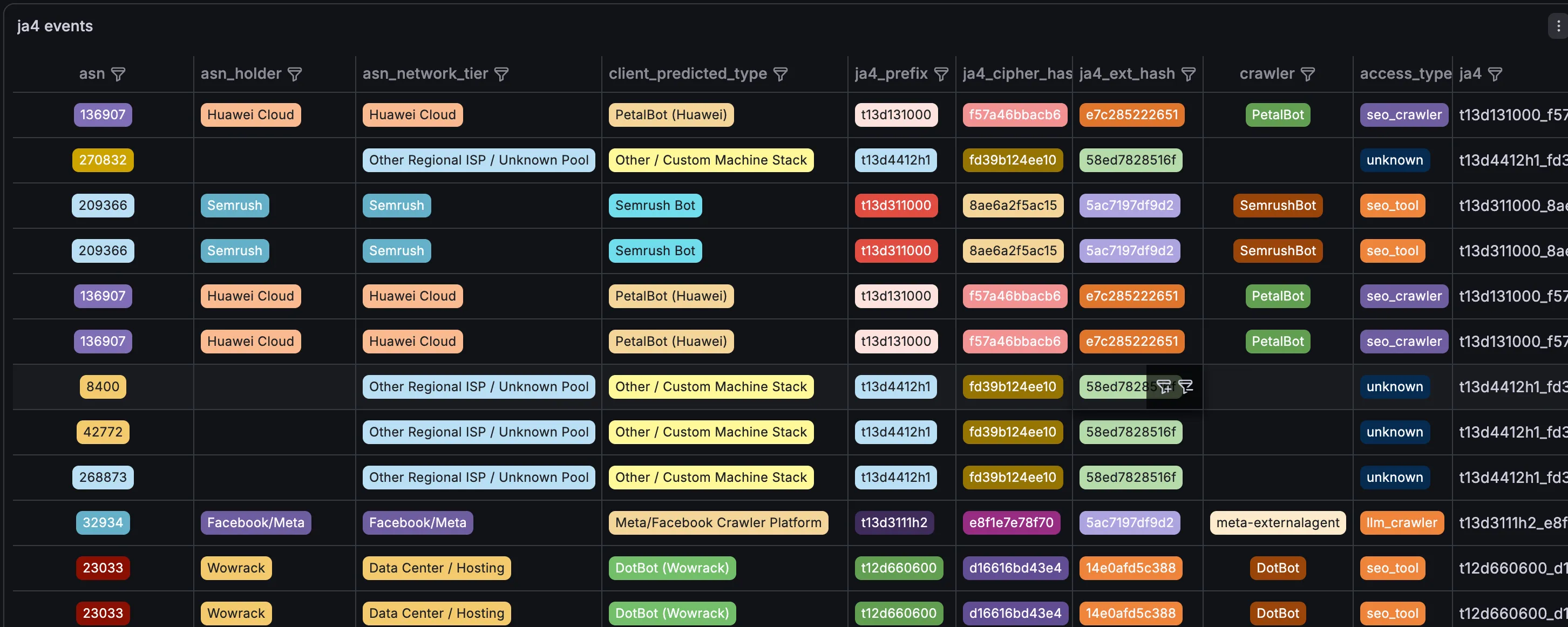
Here’s what showed up in the CloudFront logs.
Every single request in a large cluster shared one fingerprint prefix: t13d131000.
Let’s decode it field by field:
| Field | Value | Meaning |
|---|---|---|
| protocol | t | TLS connection |
| version | 13 | TLS 1.3 protocol |
| SNI | d | SNI present |
| cipher_count | 13 | 13 cipher suites offered |
| ext_count | 10 | 10 TLS extensions passed |
| ALPN | 00 | No ALPN — the smoking gun |
That last field is the smoking gun.
Every modern browser — Chrome, Safari, Firefox, Edge, mobile or desktop — negotiates ALPN during the TLS handshake to request HTTP/2 or HTTP/3. It’s been standard since 2014. A browser that sends 00 for ALPN doesn’t exist. What does exist is a raw scripting tool — Go’s crypto/tls, a stripped-down Python socket pool, an old Java runtime — that opens an encrypted TCP pipe and fires requests without caring about protocol negotiation.
Now look at what the User-Agent headers claimed:
- The first cluster: iPhone iOS 13 Safari
- The second cluster: Mac OS Chrome / Edge
Neither of those browsers has ever produced t13d131000. The mismatch is absolute.
The full fingerprint — t13d131000_f57a46bbacb6_e7c285222651 — was identical across both clusters. Different claimed browsers, different claimed operating systems, same cryptographic handshake. They’re running the same binary.
Unmasking the Infrastructure
The ASN data completes the picture.
AS132203 — Tencent Cloud (Shenzhen Tencent Computer Systems)
This is Tencent’s global cloud infrastructure. The same fingerprint appeared from nodes in the US, Brazil, Germany, South Korea, Hong Kong, Japan, and Singapore. Not a residential user in multiple countries — a single operator using Tencent’s global egress network to distribute requests across regions and avoid geographic rate limits.
AS141679 — China Telecom Big Data Industry Park
High-density enterprise hosting in China, heavily leased by automated data collection operations. All traffic from this ASN originated from CN.
The combination tells you exactly what you’re looking at: a commercial scraping operation running on Chinese cloud infrastructure, using Tencent’s global footprint to distribute load across regions.
Two Roles, One Binary
The two ASNs weren’t doing the same thing. They had distinct behavioral roles.
AS141679 — Reconnaissance
Operating exclusively from CN, this cluster targeted discovery endpoints:
/— site root/robots.txt— crawl directives/sitemap.xml— content map/config.json— probing for exposed configuration
Classic architecture enumeration. Map the site structure before committing resources to content extraction.
AS132203 — Harvesting
Using Tencent’s global proxy network, this cluster walked the content archive systematically, tag by tag:
/log/tags/api-gateway//log/tags/deployment//log/tags/aws-lambda//log/tags/terraform/
Not random crawling. Structured extraction of technical content organized by topic. The tag taxonomy became a harvest manifest.
The Classification Logic
The detection rule is a simple cross-reference. In the Athena view over CloudFront logs:
CASE
  -- No ALPN: raw scripting tool, not a browser
  WHEN substring(ja4, 9, 2) = '00'
   AND (user_agent LIKE '%Safari%' OR user_agent LIKE '%Chrome%' OR user_agent LIKE '%Firefox%')
    THEN 'spoofed_browser'

  -- Known good browser fingerprints
  WHEN substring(ja4, 1, 10) IN ('t13d1517h2', 't13d1516h2', 't13d1717h2', 't13d1716h2')
    THEN 'browser'

  ELSE 'unknown'
END AS client_predicted_type
The ALPN field alone catches the entire cluster. The ASN enrichment adds confidence and attribution. Neither check requires trusting any header data from the client.
The Residential Proxy Cluster
The Tencent cluster was easy. Data center ASNs, no ALPN, didn’t bother hiding the infrastructure. The next case is harder.
This event came in looking completely clean:
{
  "schema": "cloudless.ja4_event.v1",
  "type": "ja4",
  "site": "cloudless",
  "ip": "203.0.113.91",
  "ja4": "t13d4412h1_fd39b124ee10_58ed7828516f",
  "ja3": "e38341d16ea5e5427397e3194ad2a3f1",
  "user_agent": "Mozilla/5.0 (Macintosh; Intel Mac OS X 10_15_6) AppleWebKit/537.36 (KHTML, like Gecko) Brave Chrome/84.0.4147.125 Safari/537.36",
  "asn": "27895",
  "received_at": "2026-07-12T07:35:57.000Z"
}
ASN 27895 is Núcleo S.A. — a consumer ISP in Paraguay. Residential IP pool, not a data center. The User-Agent claims Brave on Chrome 84, macOS. On paper, this looks like an ordinary person browsing from home.
The JA4 fingerprint disagrees.
t13d4412h1 decoded:
| Field | Value | Meaning |
|---|---|---|
| cipher_count | 44 | 44 cipher suites offered |
| ext_count | 12 | 12 extensions |
| ALPN | h1 | HTTP/1.1 only |
Two problems. First, Chromium-based browsers — Chrome, Brave, Edge — have a hardcoded cryptographic profile. Depending on version, they offer between 15 and 22 cipher suites. The underlying binary compiled by Google or Brave simply does not contain 44 ciphers. This is an unpruned OpenSSL build, not a browser.
Second, and more damning: the client established TLS 1.3 but negotiated HTTP/1.1 via ALPN. Every version of desktop Chrome and Brave released in the last eight years aggressively negotiates h2 or h3 when connecting to a server that supports it. CloudFront supports HTTP/2. A real Brave browser connecting to CloudFront will never settle for h1.
The developer rented a residential proxy in Paraguay and copied a Brave User-Agent string into their headers. They forgot to configure their automation framework — likely an old Go or Python wrapper — to mimic Chromium’s actual TLS behavior.
The Same Fingerprint, Twelve Countries
The tell that confirms this is a distributed operation: t13d4412h1_fd39b124ee10_58ed7828516f appears simultaneously from consumer ISPs across:
JO (Jordan), MX (Mexico), PK (Pakistan), NP (Nepal), BR (Brazil), BD (Bangladesh), IR (Iran), ZA (South Africa), IQ (Iraq), AR (Argentina), PY (Paraguay)
A human being cannot exist in Paraguay, Jordan, and Nepal at the same hour. A group of unrelated individuals across eleven countries will not happen to run the same outdated, misconfigured Brave binary that forces HTTP/1.1 over TLS 1.3.
This is a commercial residential proxy network in active execution. One operator, one script, one centralized target list — routed through home routers and mobile devices globally to look like organic consumer traffic.
Two Attack Classes, Two Detection Methods
Putting the two clusters side by side:
| Tencent cluster | Residential proxy cluster | |
|---|---|---|
| ASN | Data center — obvious | Consumer ISP — clean-looking |
| ALPN | 00 — absent | h1 — wrong for claimed browser |
| Cipher count | 13 — stripped | 44 — unpruned OpenSSL |
| Detection signal | ASN tier + ALPN absence | JA4 / UA mismatch alone |
The Tencent cluster is caught by the ASN. Even if the JA4 were clean, a claimed iPhone on Tencent Cloud is flagged immediately. The residential proxy cluster survives the ASN check — consumer ISP, looks fine — and is only caught by the cryptographic mismatch between the claimed browser and the actual handshake.
Neither check relies on the User-Agent. Both would catch a cluster that rotated headers on every request.
Before writing a blocking rule, there’s a case worth understanding.
Some legitimate traffic also produces stripped-down TLS profiles. Mobile WebViews — links opened inside messaging apps, regional super-apps, in-app browsers — often use the host app’s TLS stack rather than the system browser’s. The result can look superficially similar to a scraper: fewer cipher suites, sometimes no ALPN.
The difference shows up in the ASN. A WebView request from a real user in Vietnam comes from Viettel (AS7552) — a consumer mobile carrier. A scraper comes from a data center ASN. The JA4 prefix might look similar; the infrastructure identity is completely different.
This is why the two signals need to be read together. JA4 alone tells you about the software. ASN tells you about the infrastructure. A stripped TLS profile on a consumer mobile carrier is probably a real user. The same profile on Tencent Cloud is not.
The Fingerprint Can Be Forged
Before treating JA4 as ground truth, it’s worth understanding its limits. Daniel Stenberg — the author of curl — wrote about this in 2022: unlike a human fingerprint, a TLS fingerprint is the result of deliberate software choices, not something you’re born with. That makes it far easier to change.
The fingerprint is a function of the TLS library, its version, and the options set by the application. Change any of those variables and you change the fingerprint. As early as 2022, tools like curl-impersonate demonstrated this — a modified curl build that produced TLS and HTTP handshakes identical to Chrome, Edge, Safari, or Firefox.
Headless browsers go further still. Playwright, Puppeteer, and Selenium drive a real browser engine — the TLS handshake is genuinely Chrome’s, because it is Chrome. No fingerprint mismatch to detect.
The clusters in this analysis were caught because they didn’t bother. The Tencent cluster used a raw scripting tool and didn’t configure ALPN. The residential proxy cluster copied a User-Agent string but forgot to match the TLS profile. A more careful operator — one who read Stenberg’s post — would have used curl-impersonate or a headless browser and sailed through undetected.
This is why JA4 is one dimension, not a verdict. Its value is in correlation:
- A clean JA4 from a data center ASN is still suspicious
- A mismatched JA4 from a consumer ISP is a strong signal
- A perfect browser fingerprint from 11 countries simultaneously is still a distributed operation
The fingerprint tells you about the software stack. The ASN tells you about the infrastructure. The behavioral pattern — which pages, what pace, what sequence — tells you about the intent. No single signal is sufficient. The combination is what makes the detection robust against operators who only fix one layer.
Observe Before You Block
The cluster is still running. The logs are still collecting.
That’s intentional. A live scraper cluster is more valuable as a data source than as a blocked IP list. Watching it tells you:
- Which content they consider worth harvesting (the tag pages, not the homepage)
- How they pace requests (steady, not bursty — designed to avoid rate limits)
- Whether the fingerprint changes (it hasn’t — same binary for weeks)
- What reconnaissance patterns precede a harvesting run
When you block, you lose all of that. When you observe, you learn how the operation works. The block can come later, with a rule that catches the next cluster too — not just this one.
The JA4 + ASN combination gives you a detection layer that survives IP rotation, header spoofing, and geographic distribution. The TLS handshake doesn’t lie. The network registration is public record. Cross-reference them, and the sophisticated scraper that evades every header-based rule becomes trivially visible.
How the Data Gets Here
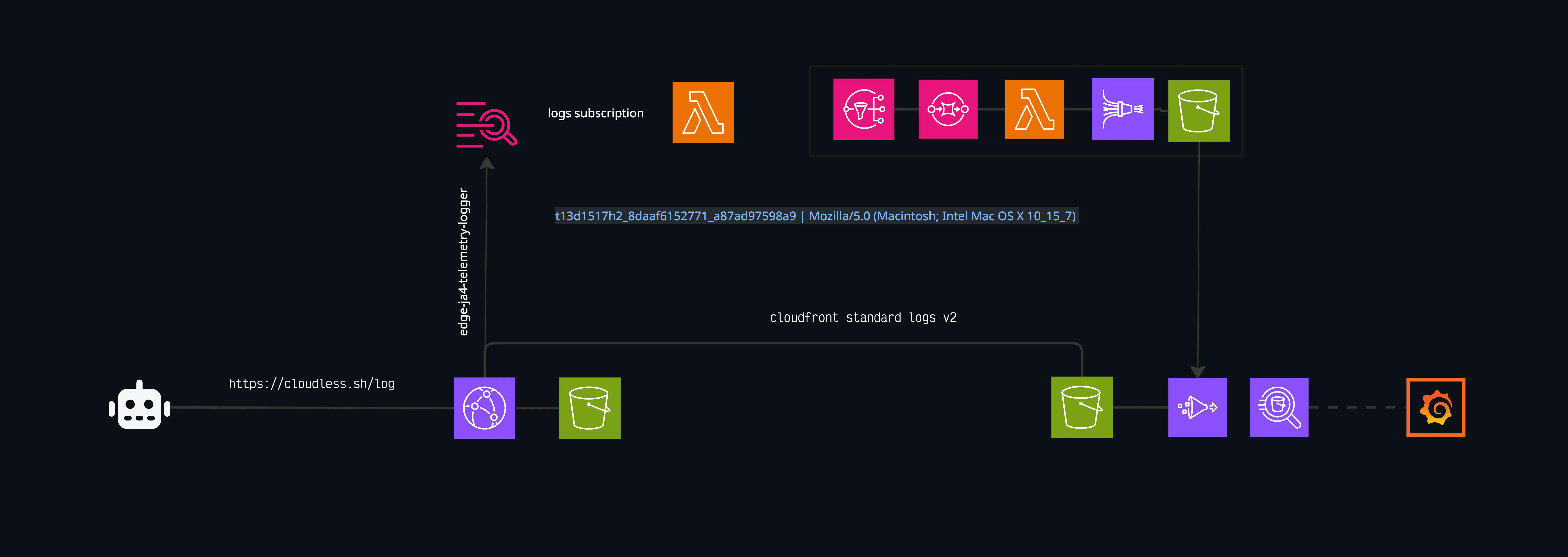
Every fingerprint in this analysis comes from a CloudFront Function running on every viewer request — zero latency impact, no backend involved. The function emits a structured log line to CloudWatch, which delivers batches to a Lambda via subscription filter. The Lambda parses, enriches, and publishes to SNS → Firehose → S3. Athena queries the partitioned dataset on demand.
HTTPS Request
    │
    ▼
CloudFront Function          ← captures ja4, ja3, ip, user_agent
    │ console.log(...)
    ▼
CloudWatch Logs
    │ subscription filter
    ▼
Lambda (bash)                ← decode, parse, enrich
    │ curl + SigV4
    ▼
SNS → Firehose → S3          ← partitioned by site/type/year/month/day
    │
    ▼
Athena + Grafana             ← client_predicted_type, asn_network_tier
The full infrastructure — Terraform, Lambda handler, Glue table, Athena view with ASN enrichment — will be covered in a follow-up post.
The pipeline behind this — CloudFront Function → CloudWatch → Lambda → SNS → Firehose → S3 → Athena — is covered in detail in part two.