· updated · skunxicat
On this page
From Analytics Pipeline to Event Ingestion
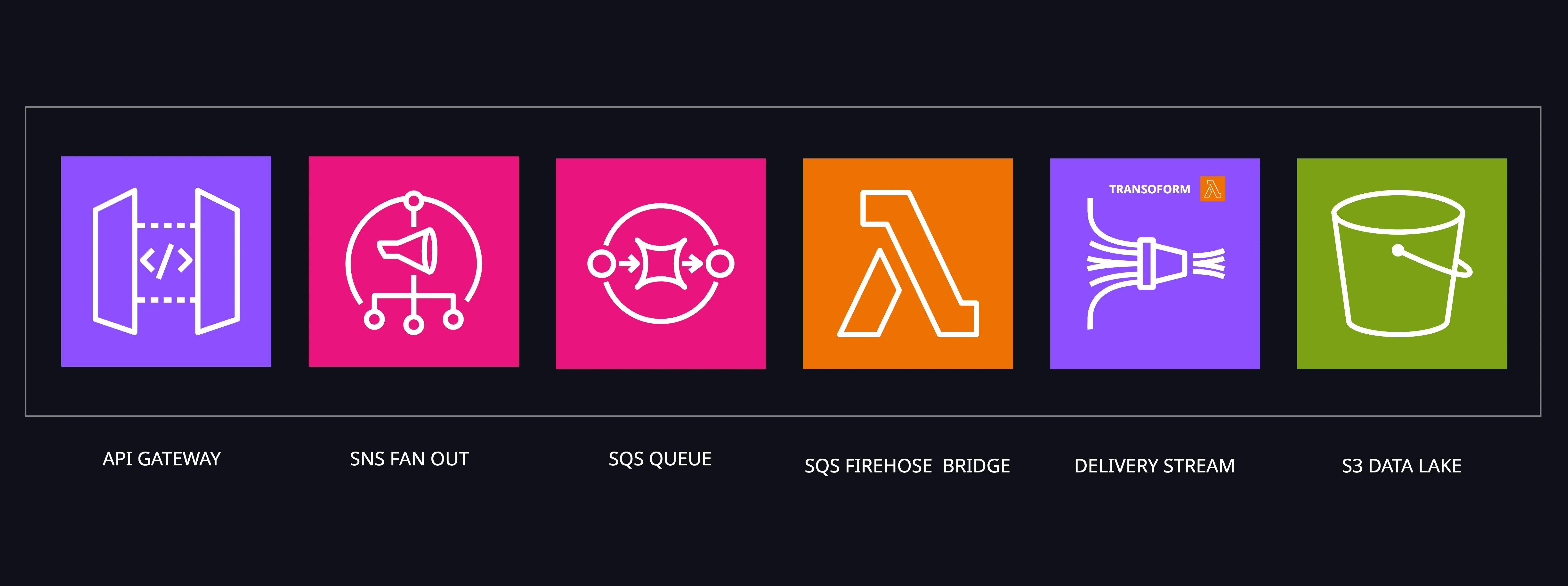
After building our serverless analytics pipeline, we had a powerful system for processing and analyzing data. SNS → Firehose → S3 gave us everything we needed to handle high-volume event streams with automatic scaling and cost efficiency.
But then came a seemingly simple request that exposed a gap in our toolkit.
The Browser Automation Challenge
We needed to analyze user behavior patterns on a website by programmatically browsing it and collecting interaction data. The plan was straightforward:
- Browser automation script collects events (clicks, page views, form submissions)
- Analytics pipeline processes and stores the data
- Athena + Grafana reveal user behavior insights
We had #2 and #3 covered perfectly. But #1 presented an unexpected problem.
The “Simple” Data Ingestion Problem
Our browser script needed to send events to our analytics pipeline. Since we’d built everything around SNS as the entry point, we needed a way to publish messages to our SNS topic.
Option 1: AWS SDK directly in the browser script
// This felt wrong immediately
const sns = new AWS.SNS();
await sns.publish({
  TopicArn: 'arn:aws:sns:...',
  Message: JSON.stringify(eventData)
}).promise();
Problems:
- AWS credentials in browser automation scripts
- Direct SNS access from client-side code
- No rate limiting or authentication
Option 2: Build a custom Lambda function
Browser → API Gateway → Lambda → SNS → Analytics PipelineThis would work, but felt like overkill for such a simple use case. We’d need:
- Lambda function to receive HTTP requests
- JSON parsing and validation
- SNS publishing logic
- Error handling and logging
- API Gateway configuration
- IAM roles and permissions
For what? To take an HTTP POST and forward it to SNS.
The “Aha” Moment
Then we remembered: API Gateway can integrate directly with SNS — no Lambda in the middle.
Browser Script → API Gateway → SNS → Analytics PipelineThis was perfect! But we needed:
- API key authentication (can’t have open endpoints)
- Rate limiting (protect against abuse)
- CORS headers (for browser requests)
- Multi-stage deployment (staging/prod)
- Proper error handling
Building this manually every time would be tedious. We needed a reusable Terraform module.
Enter terraform-aws-rest-api-sns-proxy
The module we built solves this exact problem:
module "browser_events" {
  source = "github.com/ql4b/terraform-aws-restapi-sns-proxy"

  context = module.label.context

  sns = {
    topic_name = "browser-events"
    topic_arn  = aws_sns_topic.analytics.arn
  }

  # Production-ready features
  create_usage_plan = true
  api_key_required  = true
  throttle_rate_limit = 100
  quota_limit = 10000
}
Now our browser script could simply:
// Clean, secure, simple
fetch('https://api.example.com/capture', {
  method: 'POST',
  headers: {
    'Content-Type': 'application/json',
    'X-API-Key': process.env.API_KEY
  },
  body: JSON.stringify({
    event: 'page_view',
    url: window.location.href,
    timestamp: new Date().toISOString(),
    userAgent: navigator.userAgent
  })
});
The Results
The browser automation project that started this whole journey worked beautifully:
- 5-minute setup: Deploy the module, get an API endpoint and key
- Maintenance: API Gateway and SNS handle everything — no Lambda functions to monitor
- Perfect integration: Events flowed seamlessly into our existing analytics pipeline
- Production ready: Rate limiting and authentication built-in
But more importantly, we now had a reusable tool for any event ingestion scenario.
Production-Ready Features
Conditional API Key Authentication
module "event_ingestion" {
  source = "github.com/ql4b/terraform-aws-restapi-sns-proxy"

  # Enable authentication
  create_usage_plan = true
  api_key_required  = true

  # Rate limiting
  throttle_rate_limit  = 1000  # requests per second
  throttle_burst_limit = 2000  # burst capacity
  quota_limit          = 100000 # daily quota
}
Multi-Stage Deployment
module "analytics_api" {
  source = "github.com/ql4b/terraform-aws-restapi-sns-proxy"

  stages = ["staging", "prod"]

  sns = {
    topic_name = "analytics-events"
    topic_arn  = aws_sns_topic.events.arn
  }
}
CORS Support for Web Clients
Built-in CORS headers enable direct browser integration:
// Frontend JavaScript
fetch('https://api.example.com/capture', {
  method: 'POST',
  headers: {
    'Content-Type': 'application/json',
    'X-API-Key': 'your-api-key'
  },
  body: JSON.stringify({
    event: 'user_signup',
    userId: '123',
    timestamp: new Date().toISOString()
  })
});
Beyond Browser Automation
Once we had this module, we started seeing opportunities everywhere:
Mobile App Analytics
# Collect user events from mobile apps
module "mobile_events" {
  source = "github.com/ql4b/terraform-aws-restapi-sns-proxy"

  sns = {
    topic_arn = aws_sns_topic.mobile_analytics.arn
  }

  # High-volume mobile traffic
  throttle_rate_limit = 5000
  quota_limit = 1000000
}
Webhook Endpoints
# Third-party services sending us data
module "webhook_ingestion" {
  source = "github.com/ql4b/terraform-aws-restapi-sns-proxy"

  sns = {
    topic_arn = aws_sns_topic.external_events.arn
  }

  # Secure webhook endpoint
  api_key_required = true
}
IoT Device Data
# Sensors and devices reporting metrics
module "iot_telemetry" {
  source = "github.com/ql4b/terraform-aws-restapi-sns-proxy"

  sns = {
    topic_arn = aws_sns_topic.device_metrics.arn
  }

  # Device authentication required
  create_usage_plan = true
  api_key_required = true
}
The Complete Picture
Now our analytics infrastructure had both ends covered:
# Data ingestion (the missing piece)
module "event_ingestion" {
  source = "github.com/ql4b/terraform-aws-restapi-sns-proxy"

  sns = {
    topic_arn = aws_sns_topic.events.arn
  }

  create_usage_plan = true
  api_key_required  = true
}

# Analytics pipeline (from our previous work)
module "analytics_pipeline" {
  source  = "ql4b/analytics-pipeline/aws"
  version = "~> 1.2"

  data_sources = [{
    type = "sns"
    arn  = aws_sns_topic.events.arn
  }]

  enable_transform   = true
  transform_template = "sns-transform.js"

  enable_dynamic_partitioning = true

  prefix = join("/", [
    "raw-data",
    "site=!{partitionKeyFromQuery:site}",
    "type=!{partitionKeyFromQuery:type}",
    "year=!{partitionKeyFromQuery:year}",
    "month=!{partitionKeyFromQuery:month}",
    "day=!{partitionKeyFromQuery:day}",
    ""
  ])

  dynamic_partitioning_keys = "{site: .site, type: .type, year: (.received_at|split(\"T\")|first|split(\"-\")|.[0]), month: (.received_at|split(\"T\")|first|split(\"-\")|.[1]), day: (.received_at|split(\"T\")|first|split(\"-\")|.[2])}"

  providers = {
    aws.sns_source = aws
  }
}
The browser automation script that started this journey? It now sends data through a production-grade API that automatically scales, has built-in security, and feeds into a comprehensive analytics system.
CloudPosse Integration
Built with CloudPosse patterns for consistent labeling:
module "label" {
  source = "cloudposse/label/null"

  namespace = "acme"
  name      = "analytics"
  stage     = "prod"
}

module "event_ingestion" {
  source = "github.com/ql4b/terraform-aws-restapi-sns-proxy"

  context = module.label.context

  # Automatically tagged with namespace-name-stage
}
Operational Simplicity
Monitoring:
- Built-in CloudWatch metrics for API Gateway
- SNS delivery metrics
- API Gateway logs replace Lambda function logs
Debugging:
- API Gateway access logs
- SNS message attributes
- Clear error responses
Scaling:
- API Gateway handles scaling automatically
- SNS provides unlimited fan-out
- API Gateway scales automatically
The Pattern Recognition
This experience taught us something important: the gap between “simple” and “production-ready” is often where the most valuable tools live.
Sending data to SNS is simple. But doing it securely, reliably, and at scale requires:
- Authentication and authorization
- Rate limiting and abuse protection
- Error handling and monitoring
- Multi-environment deployment
- CORS support for web clients
The terraform-aws-rest-api-sns-proxy module bridges that gap. It takes a simple need (“I want to POST data to SNS”) and makes it production-ready with a single Terraform module.
An Alternative: Lambda Function URL + Shell + SigV4
The API Gateway → SNS proxy is the right tool when you need rate limiting, API keys, or CORS for browser clients. But there’s a lighter alternative we’ve been using for server-side ingestion: a Lambda Function URL backed by a shell handler that publishes to SNS directly via curl with SigV4 signing.
The alternative is a Lambda Function URL backed by a shell handler that publishes to SNS directly via curl with SigV4 signing — no API Gateway involved:
sns_publish () {
  local topic_arn="$1"
  local message="$2"
  local region="${AWS_REGION:-us-east-1}"

  curl -sSf \
    -X POST \
    -H "Content-Type: application/x-www-form-urlencoded" \
    --aws-sigv4 "aws:amz:${region}:sns" \
    --user "${AWS_ACCESS_KEY_ID}:${AWS_SECRET_ACCESS_KEY}" \
    -H "x-amz-security-token: ${AWS_SESSION_TOKEN}" \
    "https://sns.${region}.amazonaws.com/" \
    --data-urlencode "Action=Publish" \
    --data-urlencode "TopicArn=${topic_arn}" \
    --data-urlencode "Message=${message}"
}
The Lambda execution role grants SNS publish permission — no API keys, no usage plans. The Function URL handles HTTPS termination and IAM auth for server-to-server calls.
This is the same pattern used in cloudless-signals and across our shell-first Lambda services. curl’s --aws-sigv4 flag handles the entire SigV4 signing flow, which means the full AWS API surface is available from a shell script with no SDK dependency.
When to use which
| API Gateway + SNS proxy | Lambda URL + shell + SigV4 | |
|---|---|---|
| Browser clients | ✅ CORS built-in | ❌ needs extra config |
| API key auth | ✅ built-in | manual |
| Rate limiting | ✅ built-in | ❌ |
| Server-to-server | ✅ | ✅ simpler |
| No SDK dependency | ✅ | ✅ |
| Infrastructure footprint | API GW + IAM | Lambda + IAM |
| Cold path simplicity | Terraform module | single bash function |
For browser-facing event collection the proxy module wins. For internal services publishing to SNS from Lambda, the shell + SigV4 approach is leaner and fits naturally into a shell-first Lambda architecture.
When Simple Isn’t Simple Enough
This module is perfect when you need:
- Event ingestion from any HTTP client
- Webhook endpoints that fan out to multiple services
- Analytics data collection from web/mobile apps
- IoT device telemetry with authentication
- Microservices communication via events
Skip it when you need complex request transformation or business logic before publishing. There’s also a trade-off worth naming: because the proxy is a direct pass-through, there’s no payload validation or sanitization before the message hits SNS. Malformed or oversized payloads will flow straight into your pipeline — validation relies entirely on API Gateway’s basic request validators or schema-on-read at query time. For internal services or controlled clients that’s fine; for public-facing endpoints, add a request validator or a lightweight Lambda in front if you need that guarantee.
But for the 80% case of “take this HTTP request and put it in SNS,” it’s exactly what you need.
The Cloudless Way
This module embodies our approach to infrastructure:
- Solve real problems: Born from actual project needs
- Eliminate unnecessary complexity: Direct API Gateway → SNS integration
- Production-ready by default: Authentication, rate limiting, monitoring
- Composable: Works with any SNS-based architecture
Sometimes the most valuable tools are the ones that make simple things simple to do right.
In practice, the SNS topic this module targets is the one provisioned by our terraform-aws-analytics-topic module — the same topic that feeds the SQS queue, the Go bridge Lambda, and ultimately Firehose into the S3 data lake described in Serverless Analytics Pipelines with Terraform. The proxy is the HTTP entry point; the rest of the pipeline takes it from there.
The terraform-aws-rest-api-sns-proxy module is available on GitHub. What started as a “simple” browser automation project became a reusable tool that’s now part of our standard toolkit for event-driven architectures.