· updated · skunxicat
On this page
Serverless Analytics Pipelines with Terraform
From Bespoke OpenSearch Ingestion to a Reusable S3 Data Lake
During a recent AWS account migration, we had to rebuild our production analytics pipeline from scratch — the one processing thousands of booking automation events daily. Rather than recreate the same bespoke infrastructure, we used the opportunity to modernize it and abstract the patterns into reusable Terraform modules.
What We Had
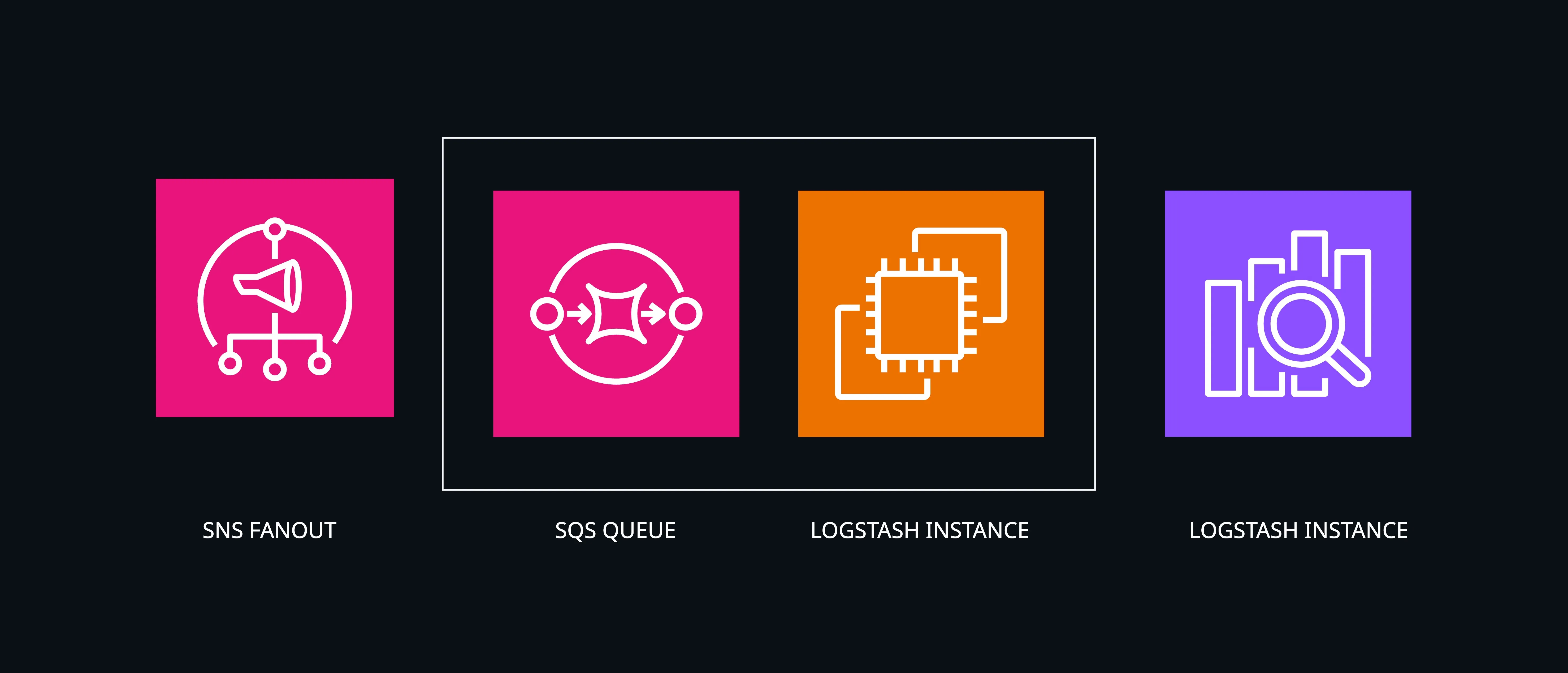
The previous implementation ingested events directly into OpenSearch via a Logstash cluster sitting between SQS and the search domain:
input {
  sqs {
    queue => "analytics-events"
  }
}

filter {
  json {
    source => "message"
  }
  mutate {
    rename => { "created_at" => "@timestamp" }
  }
}

output {
  opensearch {
    hosts => ["https://search-domain.es.amazonaws.com"]
  }
  s3 {
    bucket => "analytics-data"
    prefix => "events/%{service}/%{+YYYY}/%{+MM}/%{+dd}/"
  }
}
It worked, but the operational cost was real: Logstash instances to manage and scale, complex configuration files, an OpenSearch cluster running continuously regardless of traffic volume, and IAM policies that took longer to get right than the actual logic.
The Migration
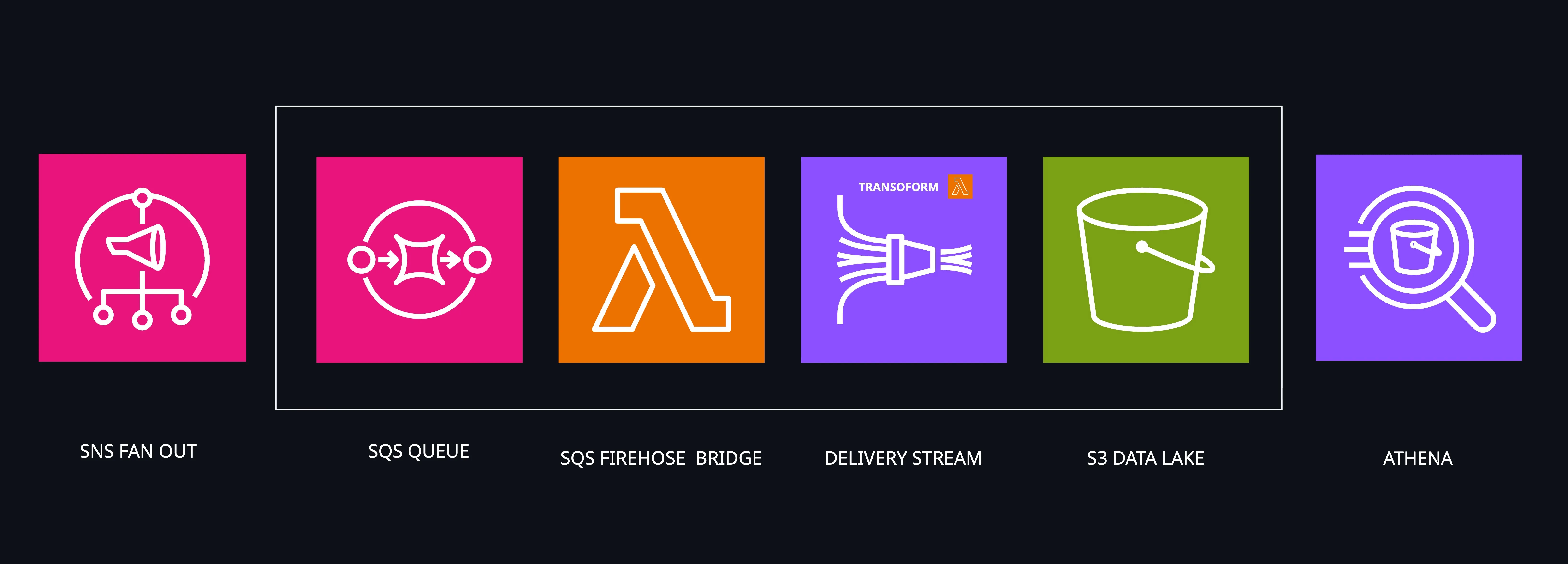
When we had to rebuild for the new account, we replaced Logstash with Kinesis Firehose — managed, serverless, and structurally identical to what we had:
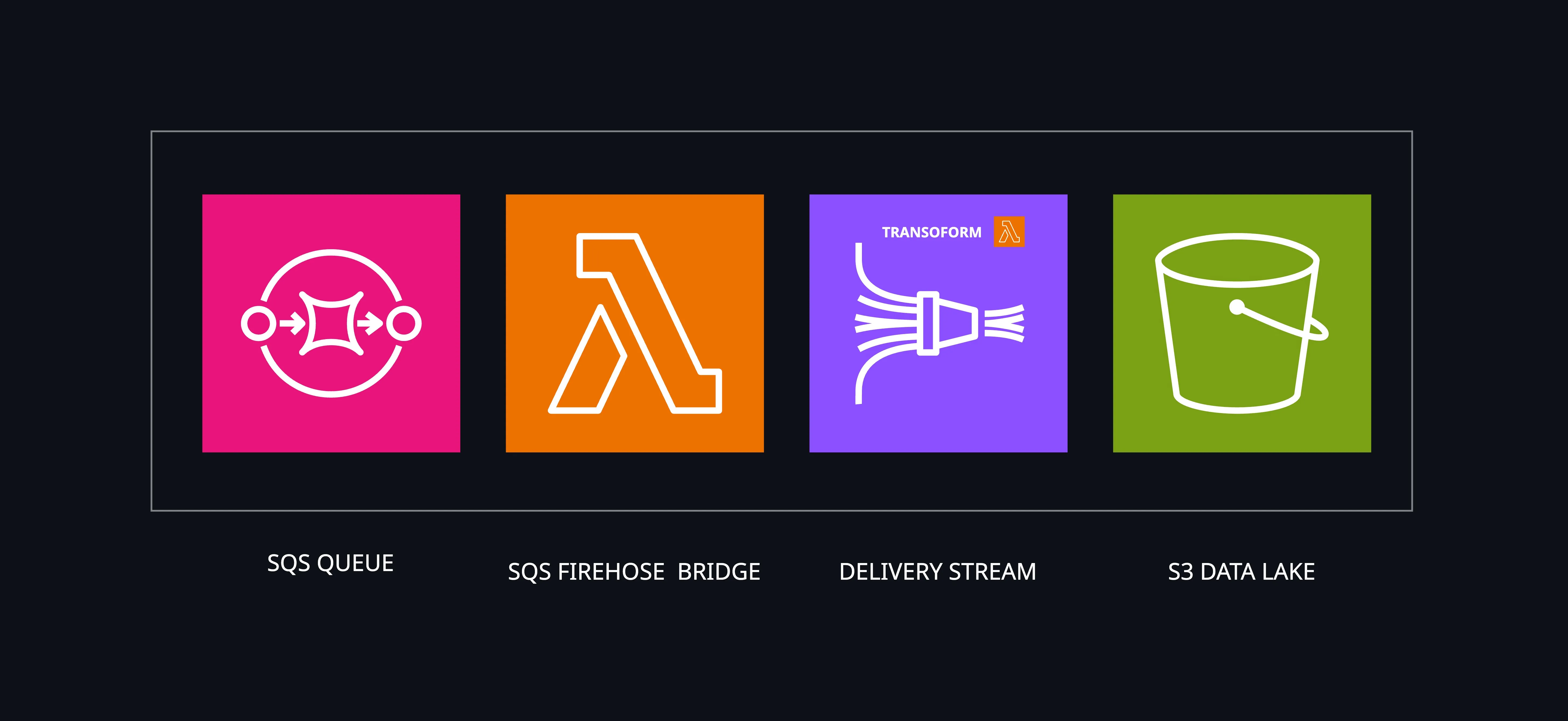
The pipeline shape is the same. Firehose handles buffering, transformation, and delivery — managed and serverless, with per-GB pricing instead of a continuously running cluster.
We also dropped OpenSearch as the primary destination. Most of our analytics workloads are batch-oriented: daily aggregations, trend analysis, ad-hoc investigation. A partitioned S3 data lake queried with Athena covers all of that at a fraction of the cost for our volume — thousands of events daily, where Firehose ingestion costs are negligible. OpenSearch remains available as an optional output for workloads that genuinely need real-time full-text search.
The equivalent Terraform configuration:
module "booking_analytics" {
  source  = "ql4b/analytics-pipeline/aws"
  version = "~> 1.2"

  context    = module.label.context
  attributes = ["booking"]

  data_sources = [{
    type = "sns"
    arn  = aws_sns_topic.booking_events.arn
  }]

  enable_transform   = true
  transform_template = "sns-transform.js"

  enable_dynamic_partitioning = true

  prefix = join("/", [
    "raw-data",
    "service=!{partitionKeyFromQuery:service}",
    "event=!{partitionKeyFromQuery:event}",
    "year=!{partitionKeyFromQuery:year}",
    "month=!{partitionKeyFromQuery:month}",
    "day=!{partitionKeyFromQuery:day}",
    ""
  ])

  dynamic_partitioning_keys = "{service: .service, event: .event, year: (.timestamp|split(\"T\")|first|split(\"-\")|.[0]), month: (.timestamp|split(\"T\")|first|split(\"-\")|.[1]), day: (.timestamp|split(\"T\")|first|split(\"-\")|.[2])}"

  providers = {
    aws.sns_source = aws
  }
}
What We Extracted
Once the migration was done, we had a clear pattern worth reusing. We split it into two focused modules:
terraform-aws-analytics-topic — Event Ingestion
Creates an SNS topic with publisher permissions. Every service that produces events gets one:
module "booking_events" {
  source = "git::https://github.com/ql4b/terraform-aws-analytics-topic.git"

  context    = module.label.context
  attributes = ["booking", "events"]

  publisher_roles = [
    "arn:aws:iam::${local.account_id}:role/booking-service-*"
  ]
}
terraform-aws-analytics-pipeline — Complete Pipeline
Takes those events and delivers them to a partitioned S3 data lake:
module "analytics" {
  source  = "ql4b/analytics-pipeline/aws"
  version = "~> 1.2"

  context    = module.label.context
  attributes = ["analytics"]

  data_sources = [{
    type = "sns"
    arn  = module.booking_events.topic_arn
  }]

  enable_transform   = true
  transform_template = "sns-transform.js"

  enable_dynamic_partitioning = true

  prefix = join("/", [
    "raw-data",
    "service=!{partitionKeyFromQuery:service}",
    "event=!{partitionKeyFromQuery:event}",
    "year=!{partitionKeyFromQuery:year}",
    "month=!{partitionKeyFromQuery:month}",
    "day=!{partitionKeyFromQuery:day}",
    ""
  ])

  dynamic_partitioning_keys = "{service: .service, event: .event, year: (.timestamp|split(\"T\")|first|split(\"-\")|.[0]), month: (.timestamp|split(\"T\")|first|split(\"-\")|.[1]), day: (.timestamp|split(\"T\")|first|split(\"-\")|.[2])}"

  providers = {
    aws.sns_source = aws
  }
}
Events land in S3 partitioned by service, event, year, month, day — ready for Athena external tables and Grafana dashboards.
How It Works
SQS as Reliable Buffer
We place an SQS queue at the front of the pipeline. Firehose has no native SQS integration, so we bridge it with a Go Lambda function that polls SQS and forwards to Firehose Direct PUT. SQS gives us guaranteed delivery, backpressure handling, and DLQs for failed messages.
The bridge ships as a pre-built zip package bundled with the module — no image to push, no ECR setup required.
SNS Transform
Our services publish to SNS topics. SNS wraps messages in metadata, so the transform template unwraps them and flattens MessageAttributes into the event:
Input:
{
  "Message": "{\"jobId\":\"123\",\"status\":\"completed\"}",
  "MessageAttributes": {
    "service": {"Value": "booking"}
  },
  "Timestamp": "2024-01-15T10:30:00Z"
}
Output:
{
  "messageId": "abc-def-123",
  "timestamp": "2024-01-15T10:30:00Z",
  "service": "booking",
  "jobId": "123",
  "status": "completed"
}
Dynamic Partitioning
Firehose extracts partition keys from the event payload and writes to Hive-style prefixes:
raw-data/service={service}/event={event}/year={year}/month={month}/day={day}/Athena reads this with schema-on-read — no ETL step, no upfront schema commitment.
Real-World Usage: The Analytics Hub
We run these modules as a centralized analytics hub — a single Terraform root that owns all the SNS topics and a unified pipeline feeding one S3 data lake:
module "airswitch_events" {
  source = "git::https://github.com/ql4b/terraform-aws-analytics-topic.git"

  context    = module.label.context
  attributes = ["airswitch", "events"]

  publisher_roles = [
    data.terraform_remote_state.airswitch.outputs.execution_role.arn
  ]
}

module "airline_events" {
  source = "git::https://github.com/ql4b/terraform-aws-analytics-topic.git"

  context    = module.label.context
  attributes = ["airline", "events"]

  publisher_roles = [
    "arn:aws:iam::${local.account_id}:role/cloudless-airline-*"
  ]
}

module "airlytics" {
  source  = "ql4b/analytics-pipeline/aws"
  version = "~> 1.2"

  context = module.label.context

  enable_transform   = true
  transform_template = "sns-transform.js"

  enable_dynamic_partitioning = true

  prefix = join("/", [
    "raw-data",
    "service=!{partitionKeyFromQuery:service}",
    "event=!{partitionKeyFromQuery:event}",
    "year=!{partitionKeyFromQuery:year}",
    "month=!{partitionKeyFromQuery:month}",
    "day=!{partitionKeyFromQuery:day}",
    ""
  ])

  dynamic_partitioning_keys = "{service: .service, event: .event, year: (.timestamp|split(\"T\")|first|split(\"-\")|.[0]), month: (.timestamp|split(\"T\")|first|split(\"-\")|.[1]), day: (.timestamp|split(\"T\")|first|split(\"-\")|.[2])}"

  data_sources = [
    { type = "sns", arn = module.airswitch_events.topic_arn },
    { type = "sns", arn = module.airline_events.topic_arn }
  ]

  providers = {
    aws.sns_source = aws
  }
}
Events from all services land in the same data lake, partitioned by source and date. One Glue table and one Athena view covers the entire hub.
The contract between services and analytics is simple: services publish to their SNS topic, analytics grants their IAM role permission to do so. No custom integrations, no shared infrastructure concerns.
Results
We’re processing thousands of automation events daily with this setup. Deployment from scratch takes under 10 minutes:
- Deploy topics — services can start publishing immediately
- Deploy pipeline — the bridge Lambda is bundled, data starts flowing to partitioned S3
- Create Glue table — point at the S3 prefix, define schema
- Query with Athena — immediate ad-hoc analysis
- Connect Grafana — Athena datasource for dashboards
The cost profile is fundamentally different from the previous setup: we pay per Athena query and per GB stored in S3, not for a continuously running cluster. At our volume — thousands of events daily — the Firehose ingestion cost is negligible.
Key Takeaways
- S3 first: durable, cheap at our volume, infinitely scalable — the right default for analytics data
- Dynamic partitioning: Firehose extracts partition keys from event payloads automatically
- Schema-on-read: Athena interprets data at query time — no upfront schema commitment
- Separate concerns: topic creation vs. pipeline deployment are independent modules
Both modules are available on GitHub: terraform-aws-analytics-topic and terraform-aws-analytics-pipeline. The pipeline is also published to the Terraform Registry. For a real-world example of the module in use, see Building a JA4 Fingerprint Pipeline on AWS.