· skunxicat
On this page
A Terraform Module for Shell Functions on Lambda
Deploy once. Ship shell scripts forever.
Why Shell on Lambda
Lambda is often associated with “applications” — Node.js handlers, Python processors, Java services. But at its core, Lambda is just a compute environment that runs code in response to events. You’re billed for memory allocated × execution duration. Nothing in that model requires a programming language.
There are tasks that fit Lambda perfectly — fetching an API, transforming JSON, calling an AWS service, piping data between systems — where a shell script is the most efficient and straightforward solution. No compilation, no dependency tree, no package manager. Just the command you’d type in a terminal, triggered by an event.
The question was never “can shell scripts run on Lambda?” — it was “how do they perform, and how do you make them easy to provision and extend?”
A concrete example: you need a function that collects GitHub traffic data daily and publishes it to an SNS topic. The entire logic is curl the GitHub API, pipe through jq to shape the JSON, curl again to POST to SNS. In Python you’d import requests, json, boto3, write a handler class, manage dependencies. In shell it’s three lines of piping.
There are several ways to run shell scripts in Lambda:
- Lambda container image — package your scripts in a Docker image with a custom runtime. Full control, but heavier deployments and slower iteration.
- Embedded runtime — bundle the bootstrap binary inside each function’s ZIP package. Works, but duplicates the runtime across every function.
- Pure Bash bootstrap — use a shell script as the bootstrap itself, calling the Runtime API with
curl. Functional, but slow (~90ms cold starts from process spawning). - Runtime as a layer — deploy a compiled bootstrap once as a shared layer, keep function packages as pure shell scripts. Fast, composable, and the runtime is maintained independently.
We explored all of these. The layer approach won on every axis — performance, maintainability, and developer experience. The benchmarks confirm it.
One might argue that compiled languages like Go, Rust, or C++ can achieve better cold starts and raw performance. That’s true for compute-heavy workloads. But not everyone writes Go, and not every task justifies a compiled binary. Shell is the lingua franca of operations — anyone who’s configured a server, deployed an application, or piped commands together already knows it. This module makes that existing skill directly deployable to Lambda.
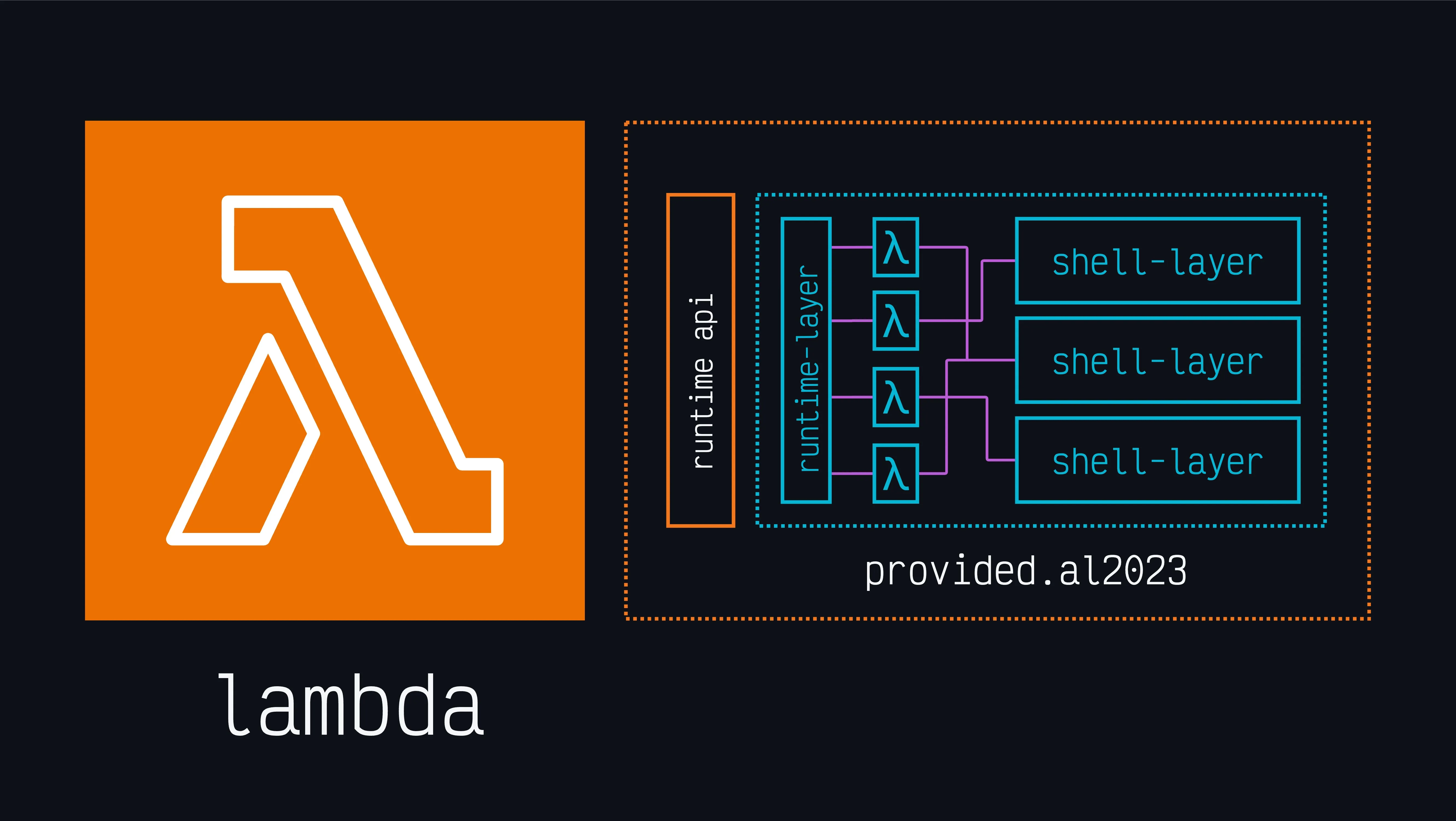
We packaged the result into a single Terraform module: terraform-aws-lambda-shell-runtime-layer. It embeds a Go-based custom runtime that handles the Lambda Runtime API loop, sources your handler script, and calls your function. Around that, it provides a clean provisioning model — deploy the runtime once as a shared layer, add tool layers as needed (jq, htmlq, uuid), and ship pure shell scripts as function packages.
One terraform apply gives you a Lambda Layer with a custom Go bootstrap. Every function that uses it is just a shell script.
run () {
    curl -Ss https://wttr.in/?format=3
}
That’s a complete Lambda function. No SDK, no framework, no build step. With the module, deploying it is:
module "shell_runtime" {
  source       = "git::https://github.com/ql4b/terraform-aws-lambda-shell-runtime-layer.git?ref=v1.0.0"
  name         = "shell-runtime"
  architecture = "arm64"
}

module "weather" {
  source       = "git::https://github.com/ql4b/terraform-aws-lambda-function.git?ref=v1.1.0"
  source_dir   = "./app"
  name         = "weather"
  runtime      = "provided.al2023"
  handler      = "handler.run"
  architecture = "arm64"
  layers       = [module.shell_runtime.layer_arn]
}
A running example
The runtime and Terraform module used in this article also power a small function that exposes the currently supported AWS Lambda runtimes as JSON.
The handler is a tiny bash function:
runtimes () {
    curl -sS https://docs.aws.amazon.com/lambda/latest/dg/lambda-runtimes.html \
        | sed -n '/<table/,/<\/table>/p' \
        | sed -n '1,/<\/table>/p' \
        | grep -o '<code class="code">[a-z0-9.]*</code>' \
        | sed 's/<[^>]*>//g' \
        | jq -R | jq -sc
}
There is no api for currently supported runtimes. This function parses that out of the lambda runtimes documentation page using grep and sed — both available in provided.al2023 without any additional layers.
At the time of writing, it returns:
[
  "nodejs24.x",
  "nodejs22.x",
  "python3.14",
  "python3.13",
  "python3.12",
  "python3.11",
  "python3.10",
  "java25",
  "java21",
  "java17",
  "java11",
  "java8.al2",
  "dotnet10",
  "dotnet9",
  "dotnet8",
  "ruby4.0",
  "ruby3.4",
  "ruby3.3",
  "provided.al2023",
  "provided.al2"
]
The Architecture
AWS Lambda’s custom runtime model is a clean contract: Lambda manages the execution environment and exposes a local HTTP API. You provide a bootstrap executable that runs in a loop — fetch the next event, hand it to your code, post the result back. There’s no framework, no lifecycle hooks, no magic. Just an HTTP conversation between your process and Lambda’s control plane.
The runtime layer pattern takes this contract and separates the execution engine from business logic:
runtime-layer (2.3MB, deployed once)
└── bootstrap    ← Go binary, raw TCP, Runtime API loop

function.zip (~1KB, deployed per function)
└── handler.sh   ← your shell script
The Go bootstrap starts in /var/runtime/bootstrap, polls the Lambda Runtime API for events, sources your handler script, calls the specified function, and returns stdout as the response. That’s the entire contract.
What You Get for Free
When you deploy a shell Lambda, you choose provided.al2023 as the runtime — AWS’s custom runtime base image built on Amazon Linux 2023. This tells Lambda: “I’m bringing my own bootstrap, just give me the OS.”
With provided.al2023, Lambda gives you Amazon Linux 2023 as the execution environment. No layers needed for:
curl(with--aws-sigv4for native AWS API signing)bash,sh,grep,sed,awk,cut,sortdate,env,mktemp,base64
This means you can call any AWS service directly with curl:
buckets () {
    curl -sSf \
        --aws-sigv4 "aws:amz:${AWS_REGION}:s3" \
        --user "${AWS_ACCESS_KEY_ID}:${AWS_SECRET_ACCESS_KEY}" \
        -H "x-amz-security-token: ${AWS_SESSION_TOKEN}" \
        "https://s3.${AWS_REGION}.amazonaws.com/"
}
No AWS CLI. No SDK. No dependencies. Just curl and the credentials Lambda already provides.
Adding Tools
When your function needs a tool the OS doesn’t include, you add a Lambda layer. The layer’s contents are mounted at /opt in the execution environment — binaries in /opt/bin are automatically on PATH.
We maintain lambda-shell-layers — a collection of frequently used CLI tools (jq, htmlq, uuid, yq, pcre2grep, http-cli) pre-built as zip files for both arm64 and x86_64. Each release publishes architecture-specific zips ready to be deployed as a layer using our terraform-aws-lambda-layer module:
module "shell_runtime" {
  source       = "git::https://github.com/ql4b/terraform-aws-lambda-shell-runtime-layer.git?ref=v1.0.0"
  name         = "shell-runtime"
  architecture = "arm64"
}

module "jq" {
  source     = "git::https://github.com/ql4b/terraform-aws-lambda-layer.git?ref=v1.2.0"
  name       = "jq"
  source_url = "https://github.com/ql4b/lambda-shell-layers/releases/download/v0.0.3/jq-arm64-layer.zip"
}

module "my_function" {
  source       = "git::https://github.com/ql4b/terraform-aws-lambda-function.git?ref=v1.1.0"
  source_dir   = "./app"
  name         = "my-function"
  runtime      = "provided.al2023"
  handler      = "handler.run"
  architecture = "arm64"
  layers       = [module.shell_runtime.layer_arn, module.jq.layer_arn]
}
Each function gets only the layers it needs. The runtime is shared across all functions in the region.
Multiple Functions, One Runtime
The layer is deployed once per region. Every shell function reuses it:
module "function_a" {
  source       = "git::https://github.com/ql4b/terraform-aws-lambda-function.git?ref=v1.1.0"
  source_dir   = "./app"
  name         = "function-a"
  runtime      = "provided.al2023"
  handler      = "handler.a"
  architecture = "arm64"
  layers       = [module.shell_runtime.layer_arn]
}

module "function_b" {
  source       = "git::https://github.com/ql4b/terraform-aws-lambda-function.git?ref=v1.1.0"
  source_dir   = "./app"
  name         = "function-b"
  runtime      = "provided.al2023"
  handler      = "handler.b"
  architecture = "arm64"
  layers       = [module.shell_runtime.layer_arn]
}
Function packages are ~1KB. Deployments are instant. Runtime updates don’t touch your functions.
The Handler Contract
The handler format is <file>.<function>:
handler.run→ sourcehandler.sh, callrun()handler.events→ sourcehandler.sh, callevents()lib.process→ sourcelib.sh, callprocess()
The event payload is available via stdin. Your function’s stdout becomes the Lambda response.
Get Started
git clone https://github.com/ql4b/terraform-aws-lambda-shell-runtime-layer
cd terraform-aws-lambda-shell-runtime-layer/examples/basic
terraform init
terraform apply
Four example deployments are included:
- basic — minimal function, runtime only
- endpoints — Function URLs (public + IAM-authenticated)
- aws-services — S3, DynamoDB, SNS, SSM, SQS via curl + SigV4
- complete — multiple functions with different layer combinations
Performance
All values in milliseconds. Measured on provided.al2023, 128MB memory, using lambda-benchmarks.
arm64 (Graviton)
| Function | Layers | median | p90 | p99 |
|---|---|---|---|---|
| weather | 2 (runtime + jq) | 19.06 | 22.32 | 27.56 |
| events | 2 (runtime + jq) | 19.15 | 22.18 | 22.50 |
| id | 3 (runtime + jq + uuid) | 19.29 | 22.12 | 22.77 |
| runtimes | 3 (runtime + jq + htmlq) | 19.20 | 22.30 | 23.29 |
| status | 3 (runtime + jq + http-cli) | 19.98 | 22.26 | 22.79 |
x86_64
| Function | Layers | median | p90 | p99 |
|---|---|---|---|---|
| weather | 1 (runtime) | 25.71 | 26.67 | 28.10 |
| events | 2 (runtime + jq) | 25.56 | 26.14 | 26.52 |
| id | 3 (runtime + jq + uuid) | 25.65 | 26.20 | 32.12 |
| runtimes | 3 (runtime + jq + htmlq) | 25.70 | 26.47 | 28.14 |
| status | 3 (runtime + jq + http-cli) | 25.54 | 26.50 | 28.79 |
arm64 is ~25% faster and 20% cheaper. Layer count has no meaningful impact — 1 layer vs 3 layers, same cold start. The IQR stays under 4ms across all configurations.
How Cold Starts Were Measured
We force fresh execution environments by updating a function’s environment variable, then burst 120 concurrent invocations (parallel -j 60). Lambda provisions a new environment for each concurrent request. After logs flush, we extract Init Duration from REPORT lines and compute stats with datamash.
No artificial warmup. No sequential invocations. Real cold starts from a single burst.
Where This Fits
This module is the production-ready distillation of our shell Lambda journey. The progression:
- Pure Bash bootstrap — functional, ~90ms cold starts
- Go + Bash hybrid — better, ~42ms
- Raw TCP sockets — breakthrough, ~21ms
- Runtime-as-a-layer — optimal architecture, ~19ms on arm64, zero overhead from separation
The module ships pre-built binaries for both arm64 and x86_64. The Go source is in the repo if you want to inspect or rebuild it.
Local Testing with Docker
You don’t need to deploy to AWS to test your shell functions. The module ships two Dockerfiles that replicate the Lambda execution environment locally using the Lambda Runtime Interface Emulator (RIE).
How the Lambda Runtime Interface Emulator Works
When Lambda invokes your function in production, your bootstrap communicates with the Lambda Runtime API — a local HTTP endpoint inside the execution environment. The bootstrap polls GET /runtime/invocation/next to receive events, then posts results back to POST /runtime/invocation/{requestId}/response.
The RIE is a proxy that implements this same API locally. It’s baked into all AWS Lambda base images at /usr/local/bin/aws-lambda-rie. When you run a Lambda container image locally, the RIE intercepts requests on port 8080 and translates them into the Runtime API calls your bootstrap expects.
The flow:
curl POST :9000/invocations
        │
        ▼
┌─────────────────────┐
│  Lambda RIE (:8080) │   ← emulates the Lambda control plane
└─────────┬───────────┘
          │ GET /runtime/invocation/next
          ▼
┌─────────────────────┐
│  bootstrap (Go)     │   ← your custom runtime
│  source handler.sh  │
│  call function()    │
│  POST /response     │
└─────────────────────┘
Your bootstrap doesn’t know it’s running locally. The Runtime API contract is identical — same endpoints, same headers, same behavior. If it works locally, it works on Lambda.
The Local Testing Strategy
The Dockerfiles use public.ecr.aws/lambda/provided:al2023 as the base image — the same image Lambda uses in production. This gives you:
- Same OS (Amazon Linux 2023)
- Same filesystem layout (
/var/runtime/bootstrap,/var/task/,/opt/) - Same available utilities (curl with
--aws-sigv4, bash, grep, sed, awk) - Same RIE built-in for local invocation
- Same PATH resolution for layer binaries in
/opt/bin/
The only difference from production: the RIE fronts the Runtime API instead of Lambda’s actual control plane. Everything your code touches is identical.
Basic — Runtime Only
Tests your shell function with just the runtime layer and what provided.al2023 ships (curl, bash, coreutils):
FROM public.ecr.aws/lambda/provided:al2023 AS build
RUN microdnf install -y unzip && microdnf clean all
COPY runtime/ /tmp/runtime/
RUN unzip /tmp/runtime/bootstrap-arm64.zip -d /var/runtime && chmod +x /var/runtime/bootstrap

FROM public.ecr.aws/lambda/provided:al2023
COPY --from=build /var/runtime/bootstrap /var/runtime/bootstrap
COPY examples/basic/app/ /var/task/
ENV PATH="/opt/bin:${PATH}"
CMD ["handler.run"]
docker build -f basic.Dockerfile --platform linux/arm64 -t shell-basic .
docker run --rm --platform linux/arm64 -p 9000:8080 shell-basicInvoke:
curl -s -XPOST http://localhost:9000/2015-03-31/functions/function/invocations -d '{}'Sant Celoni, Catalonia, ES: ☀️ +18°CThe invocation URL (/2015-03-31/functions/function/invocations) is the RIE’s external endpoint — it accepts your test payload, feeds it through the Runtime API to your bootstrap, and returns the response. This is the only URL you interact with during local testing.
Complete — Runtime + Tool Layers
Tests functions that depend on additional CLI tools. The Dockerfile downloads layer zips from GitHub releases and unpacks them to /opt/bin/ — exactly where Lambda mounts layer contents:
FROM public.ecr.aws/lambda/provided:al2023 AS build
RUN microdnf install -y unzip && microdnf clean all
COPY runtime/ /tmp/runtime/
RUN unzip /tmp/runtime/bootstrap-arm64.zip -d /var/runtime && chmod +x /var/runtime/bootstrap
RUN curl -sSL -o /tmp/jq.zip "https://github.com/ql4b/lambda-shell-layers/releases/download/v0.0.4/jq-arm64-layer.zip" \
    && curl -sSL -o /tmp/uuid.zip "https://github.com/ql4b/lambda-shell-layers/releases/download/v0.0.4/uuid-arm64-layer.zip" \
    && curl -sSL -o /tmp/htmlq.zip "https://github.com/ql4b/lambda-shell-layers/releases/download/v0.0.4/htmlq-arm64-layer.zip" \
    && for zip in /tmp/*.zip; do unzip -o "$zip" -d /opt; done

FROM public.ecr.aws/lambda/provided:al2023
COPY --from=build /var/runtime/bootstrap /var/runtime/bootstrap
COPY --from=build /opt/bin/ /opt/bin/
COPY examples/complete/app/ /var/task/
ENV PATH="/opt/bin:${PATH}"
CMD ["handler.weather"]
docker build -f Dockerfile --platform linux/arm64 -t shell-complete .
docker run --rm --platform linux/arm64 -p 9000:8080 shell-completeThe default handler is handler.weather. Override the CMD to test other functions:
# Test uuid + jq
docker run --rm --platform linux/arm64 -p 9000:8080 shell-complete handler.id

# Test htmlq + jq
docker run --rm --platform linux/arm64 -p 9000:8080 shell-complete handler.runtimes
Then invoke:
curl -s -XPOST http://localhost:9000/2015-03-31/functions/function/invocations -d '{}'{"id": "5820b7a2-14d8-4bb1-a811-b9a80b4fd569"}Testing With Event Payloads
The -d flag in the curl invocation is the event payload your function receives on stdin. For simple functions that don’t read stdin, an empty {} works. For functions that process events:
# Simulate an event payload
curl -s -XPOST http://localhost:9000/2015-03-31/functions/function/invocations \
  -d '{"origin": "BCN", "destination": "MXP", "date": "2026-08-01"}'
Your function reads it from stdin as usual:
search () {
    local event=$(cat)
    local origin=$(echo "$event" | jq -r '.origin')
    local destination=$(echo "$event" | jq -r '.destination')
    curl -sS "https://api.example.com/flights?from=$origin&to=$destination"
}
Why This Matters for Development
The deploy-test cycle for Lambda traditionally looks like: edit → zip → upload → invoke → check CloudWatch logs. With local Docker testing:
- Instant feedback — invoke in milliseconds, no deploy
- Real environment — same OS, same binaries, same PATH
- Layer validation — confirm your tool layers work before deploying
- Event simulation — craft and replay any event payload locally
- No AWS costs — iterate freely without Lambda invocations or CloudWatch charges
The local container is not an approximation — it’s the same runtime executing the same bootstrap against the same Runtime API contract. The only thing missing is AWS service integrations (IAM roles, VPC, event source mappings), which belong in integration tests after deployment.
Quick Reference
| Command | Purpose |
|---|---|
docker build -f basic.Dockerfile --platform linux/arm64 -t shell-basic . | Build runtime-only image |
docker build -f Dockerfile --platform linux/arm64 -t shell-complete . | Build runtime + layers image |
docker run --rm --platform linux/arm64 -p 9000:8080 <image> [handler] | Start local Lambda |
curl -s -XPOST http://localhost:9000/2015-03-31/functions/function/invocations -d '{}' | Invoke function |
Shell scripts shouldn’t need frameworks to become APIs. This module makes that real — sub-20ms cold starts, composable layers, and function packages measured in bytes.
Related
- Shell on Lambda: The Complete Journey — the full performance evolution that led here
- Lambda Container Images vs ZIP: The UPX Trap — packaging format benchmarks
- Test Lambda Functions Locally — Docker + RIE for local development
- Lambda Custom Runtime for Shell Scripts — the original container image approach