· skunxicat
On this page
Alexa, what’s the WiFi password?
How turning your router into an API unlocks voice-controlled networking
The Problem Every Host Faces
“What’s your WiFi password?”
It’s the question every visitor asks. You scramble to find the printed card, or try to remember if you changed it recently, or awkwardly spell out “MySecurePassword123!” while they type it in.
What if your house could just tell them?
The Traditional Solutions
Printed QR codes - Great until you change the password Password managers - Requires sharing accounts Guest networks - More complexity to manage Writing it down - Gets lost, becomes outdated
The real problem: Static solutions for dynamic information.
The Alexa Skill Approach
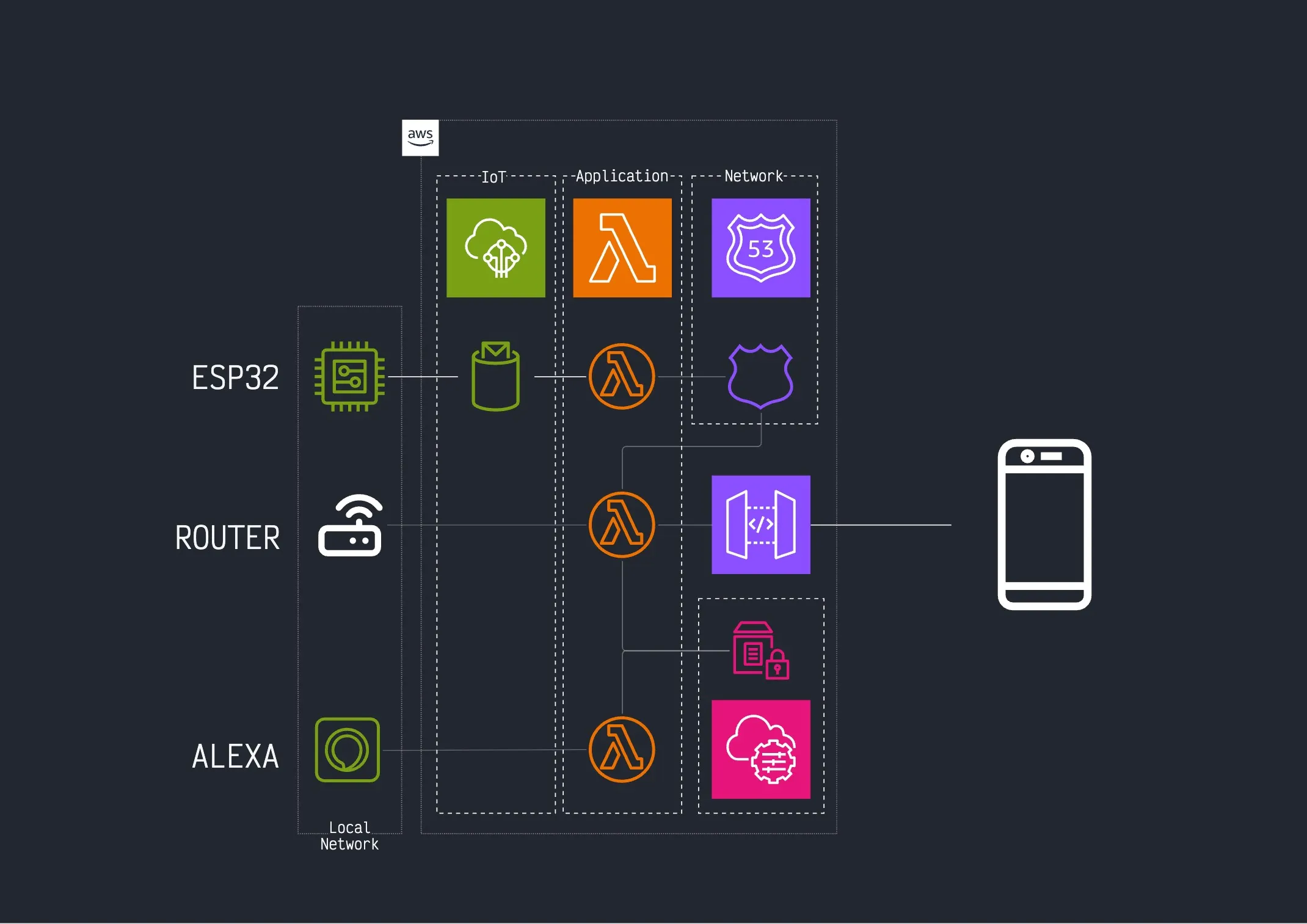
Once you have router-api running, the Alexa skill becomes almost trivial:
“Alexa, what’s the WiFi password?”
- Alexa skill calls your router API
- Router API extracts current WiFi credentials
- Generates a QR code with current password
- Displays QR code on Echo Show screen
- Visitor scans and connects instantly
The magic: Always current, always available, zero maintenance.
The Implementation
Router API Extension
#!/bin/bash

wifi_credentials() {
    router_login

    # Get WiFi settings page
    local wifi_page=$(curl -s -b /tmp/router_cookies \
        "http://$ROUTER_IP/wireless.html")

    # Extract SSID and password
    local ssid=$(echo "$wifi_page" | htmlq 'input[name="ssid"]' --attribute value)
    local password=$(echo "$wifi_page" | htmlq 'input[name="wpa_psk"]' --attribute value)

    # Generate WiFi QR code data
    local qr_data="WIFI:T:WPA;S:$ssid;P:$password;;"

    echo "$qr_data" | qrencode -o - -t PNG | base64 | jq -R '{
        ssid: "'$ssid'",
        password: "'$password'",
        qr_code: .,
        qr_data: "'$qr_data'"
    }'
}
Alexa Skill Handler
// Alexa skill intent handler
const WiFiPasswordIntentHandler = {
    canHandle(handlerInput) {
        return handlerInput.requestEnvelope.request.type === 'IntentRequest'
            && handlerInput.requestEnvelope.request.intent.name === 'WiFiPasswordIntent';
    },
    async handle(handlerInput) {
        // Call your router API
        const response = await fetch(`${ROUTER_API_ENDPOINT}/wifi/credentials`, {
            headers: { 'X-Api-Key': API_KEY }
        });

        const wifiData = await response.json();

        const speakOutput = `The WiFi network is ${wifiData.ssid}. I'm showing the QR code on your screen.`;

        return handlerInput.responseBuilder
            .speak(speakOutput)
            .addDirective({
                type: 'Alexa.Presentation.APL.RenderDocument',
                document: qrCodeTemplate,
                datasources: {
                    qrCodeData: {
                        ssid: wifiData.ssid,
                        qrCodeImage: `data:image/png;base64,${wifiData.qr_code}`
                    }
                }
            })
            .getResponse();
    }
};
Why This Works So Well
1. Always Current
- QR code reflects actual router settings
- Password changes automatically propagate
- No manual updates needed
2. Frictionless Experience
- Visitor asks Alexa
- QR code appears instantly
- One scan connects them
3. Leverages Existing Infrastructure
- Router API handles the complexity
- Alexa provides the interface
- QR codes work on any phone
4. Extensible Foundation
- Same API can power other automations
- Voice interface opens new possibilities
- Foundation for more router control
The Network Effect Begins
Once you have voice-controlled WiFi credentials, the next questions become obvious:
“Alexa, reboot the router”
router_reboot_skill() {
    curl -X POST "$ROUTER_API_ENDPOINT/reboot" \
        -H "X-Api-Key: $API_KEY"

    echo '{"message": "Router reboot initiated. Network will be back in 2 minutes."}'
}
“Alexa, change the WiFi password”
wifi_password_change() {
    local new_password=$(generate_secure_password)

    router_login

    # Update WiFi password
    curl -s -b /tmp/router_cookies \
        -d "ssid=$CURRENT_SSID&wpa_psk=$new_password&action=save" \
        "http://$ROUTER_IP/wireless.html"

    # Generate new QR code
    local qr_data="WIFI:T:WPA;S:$CURRENT_SSID;P:$new_password;;"
    echo "$qr_data" | qrencode -o - -t PNG | base64 | jq -R '{
        new_password: "'$new_password'",
        qr_code: .
    }'
}
“Alexa, who’s on the WiFi?”
wifi_devices() {
    # Reuse the router_stations function from router-api
    router_stations | jq '{
        device_count: length,
        devices: map(.hostname) | join(", ")
    }'
}
The Compound Value
What started as: “I want to automate my router”
Became: “I want voice-controlled networking”
Led to: Complete smart home integration
The pattern:
- Identify the interface (router web UI)
- Create the API (shell scripts + Lambda)
- Add voice control (Alexa skill)
- Extend functionality (more commands)
- Integrate everywhere (smart home, monitoring, automation)
Beyond WiFi Passwords
Once you have the foundation, every router function becomes voice-controllable:
Network monitoring: “Alexa, is the internet working?” Device management: “Alexa, kick John’s phone off WiFi” Security: “Alexa, enable guest network for 2 hours” Troubleshooting: “Alexa, run network diagnostics”
The Philosophy in Action
This is infrastructure that gets out of your way.
- Router manufacturer built the interface
- Shell scripts made it programmable
- Lambda made it scalable
- Alexa made it conversational
Each layer builds on the previous, adding value without complexity.
The Real Magic
Your router is now a smart home device - without flashing firmware, without buying new hardware, without vendor lock-in.
Your visitors get instant WiFi access - without passwords, without typing, without friction.
Your network becomes voice-controllable - without complex setup, without ongoing maintenance, without breaking existing functionality.
Conclusion
The Alexa skill is trivial once you have the API.
The hard work was turning the web interface into a programmable interface. Once that’s done, voice control is just another client.
This is the network effect of good infrastructure:
- Solve one problem well (router API)
- Enable new possibilities (voice control)
- Compound value emerges naturally
“Alexa, what’s the WiFi password?” isn’t just a convenience feature.
It’s proof that boring technology can create magical experiences.
This is part of the cloudless philosophy - infrastructure that gets out of your way.